Top.jsp
1 2 3 4 5 6 7 8 9 10 11 12 13 14 15 | <%@ page language="java" contentType="text/html; charset=EUC-KR" pageEncoding="EUC-KR"%> <% request.setCharacterEncoding("euc-kr"); %> <!DOCTYPE html PUBLIC "-//W3C//DTD HTML 4.01 Transitional//EN" "http://www.w3.org/TR/html4/loose.dtd"> <html> <head> <meta http-equiv="Content-Type" content="text/html; charset=EUC-KR"> <title>top.jsp</title> </head> <body> Login | Join </body> </html> |
left.jsp
1 2 3 4 5 6 7 8 9 10 11 12 13 14 15 16 17 18 | <%@ page language="java" contentType="text/html; charset=EUC-KR" pageEncoding="EUC-KR"%> <% request.setCharacterEncoding("euc-kr"); %> <!DOCTYPE html PUBLIC "-//W3C//DTD HTML 4.01 Transitional//EN" "http://www.w3.org/TR/html4/loose.dtd"> <html> <head> <meta http-equiv="Content-Type" content="text/html; charset=EUC-KR"> <title>left.jsp</title> </head> <body> <center> <a href="./template.jsp?page=newitem">신상품</a> <br> <a href="./template.jsp?page=bestitem">인기상품</a> </center> </body> </html> |
newitem.jsp
1 2 3 4 5 6 7 8 9 10 11 12 13 14 15 16 17 | <%@ page language="java" contentType="text/html; charset=EUC-KR" pageEncoding="EUC-KR"%> <% request.setCharacterEncoding("euc-kr"); %> <!DOCTYPE html PUBLIC "-//W3C//DTD HTML 4.01 Transitional//EN" "http://www.w3.org/TR/html4/loose.dtd"> <html> <head> <meta http-equiv="Content-Type" content="text/html; charset=EUC-KR"> <title>newitem.jsp</title> </head> <body> <center> <h2>신상품 목록입니다.</h2> </center> </body> </html> |
bestitem.jsp
1 2 3 4 5 6 7 8 9 10 11 12 13 14 | <%@ page language="java" contentType="text/html; charset=EUC-KR" pageEncoding="EUC-KR"%> <!DOCTYPE html PUBLIC "-//W3C//DTD HTML 4.01 Transitional//EN" "http://www.w3.org/TR/html4/loose.dtd"> <html> <head> <meta http-equiv="Content-Type" content="text/html; charset=EUC-KR"> <title>bestitem.jsp</title> </head> <body> <center> <h2>인기상품 목록입니다.</h2> </center> </body> </html> |
bottom.jsp
1 2 3 4 5 6 7 8 9 10 11 12 13 14 15 16 17 | <%@ page language="java" contentType="text/html; charset=EUC-KR" pageEncoding="EUC-KR"%> <% request.setCharacterEncoding("euc-kr"); %> <!DOCTYPE html PUBLIC "-//W3C//DTD HTML 4.01 Transitional//EN" "http://www.w3.org/TR/html4/loose.dtd"> <html> <head> <meta http-equiv="Content-Type" content="text/html; charset=EUC-KR"> <title>bottom.jsp</title> </head> <body> <center>Since 2017</center> </body> </html> |
template.jsp
1 2 3 4 5 6 7 8 9 10 11 12 13 14 15 16 17 18 19 20 21 22 23 24 25 26 27 28 29 30 31 32 33 34 35 36 | <%@ page language="java" contentType="text/html; charset=EUC-KR" pageEncoding="EUC-KR"%> <% request.setCharacterEncoding("euc-kr"); %> <%--여기가 첫 화면 입니다~~~ --%> <!DOCTYPE html PUBLIC "-//W3C//DTD HTML 4.01 Transitional//EN" "http://www.w3.org/TR/html4/loose.dtd"> <html> <head> <meta http-equiv="Content-Type" content="text/html; charset=EUC-KR"> <title>template.jsp</title> </head> <body> <% String pagefile = request.getParameter("page"); if (pagefile == null) { pagefile = "newitem"; } %> <form name="f1" method="get"> <table border="1" cellpadding="15" cellspacing="0" width="800" height="300"> <tr> <td colspan="2"><jsp:include page="top.jsp"></jsp:include></td> </tr> <tr> <td><jsp:include page="left.jsp"></jsp:include></td> <td width="650"><jsp:include page='<%=pagefile + ".jsp"%>'></jsp:include></td> </tr> <tr> <td colspan="2"><jsp:include page="bottom.jsp"></jsp:include></td> </tr> </table> </form> </body> </html> |
include 액션 태그를 이용하여 페이지를 합쳐줍니다.
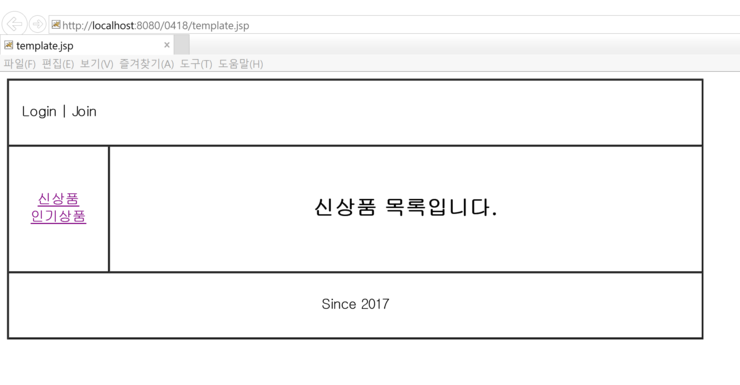
template에서 실행한 첫 화면입니다.
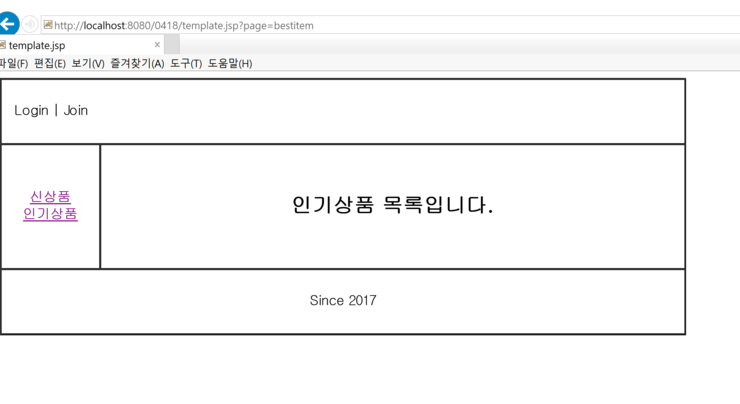
인기 상품을 눌렸을 때의 화면입니다. 인기 상품을 눌리면 주소값에 '?page=bestitem'이 추가 되신 걸 볼 수 있습니다.
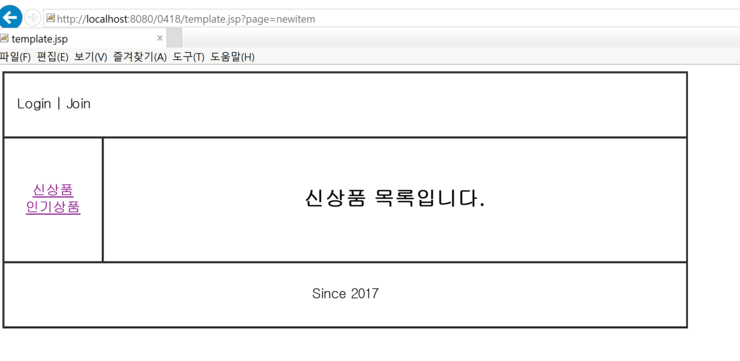
이 화면은 신상품을 눌렸을 때의 화면입니다. 인기 상품을 눌리면 주소값에 '?page=newitem'이 추가 되신 걸 볼 수 있습니다.
여기서 가장 중요한 건 left.jsp와 template.jsp입니다.
'code > JSP' 카테고리의 다른 글
| [JSP] 자바 빈즈 이용한 예제 (0) | 2017.04.20 |
|---|---|
| [JSP]Application, Session, Request 예제 (0) | 2017.04.20 |
| [JSP] request 객체 테스트 (0) | 2017.04.20 |
| [JSP]get 방식에서 한글이 깨짐 현상 (0) | 2017.04.20 |
| [JSP] 웹 에러 페이지 /web error page 처리 (0) | 2017.04.20 |