(adsbygoogle = window.adsbygoogle || []).push({ google_ad_client: "ca-pub-8242763509535969", enable_page_level_ads: true }); 'code' 카테고리의 글 목록 (4 Page) :: 깜냥깜냥
1
2
3
4
5
6
7
8
9
10
11
12
13
14
15
16
17
18
19
20
21
22
23
24
25
26
27
28
29
30
31
32
33
34
35
36
37
38
39
40
41
42
43
44
45
46
47
48
49
50
51
52
53
54
55
56
57
58
59
60
61
62
63
64
65
66
67
68
69
70
71
72
73
74
75
76
77
78
79
80
81
82
83
84
85
86
87
88
89
90
91
92
<!DOCTYPE html>
<html>
<head>
<meta http-equiv="Content-Type" content="text/html; charset=utf-8" />
<title>10000Calendar</title>
<style type="text/css">
.satu {
    color: skyblue;
}
 
.sund {
    color: #F79DC2;
}
</style>
<script language="javascript">
    var today = new Date(); // 오늘 날짜
    var date = new Date();
 
    function prevCalendar() {
        // 이전 달을 today에 값을 저장하고 달력을 뿌려줍니다.
        today = new Date(today.getFullYear(), today.getMonth() - 1, today
                .getDate());
        buildCalendar();
    }
    function nextCalendar() {
        // 다음 달을 today에 값을 저장하고 달력을 뿌려줍니다.
        today = new Date(today.getFullYear(), today.getMonth() + 1, today
                .getDate());
        buildCalendar();
    }
    function buildCalendar() {
        var nMonth = new Date(today.getFullYear(), today.getMonth(), 1); // 이번 달의 첫째 날
        var lastDate = new Date(today.getFullYear(), today.getMonth() + 1, 0); // 이번 달의 마지막 날
        var tblCalendar = document.getElementById("calendar"); // 테이블 달력을 만들 테이블
        var tblCalendarYM = document.getElementById("calendarYM"); // yyyy년 m월 출력할 곳
        tblCalendarYM.innerHTML = today.getFullYear() + "년 "
                + (today.getMonth() + 1) + "월"// yyyy년 m월 출력
        // 기존 테이블에 뿌려진 줄, 칸 삭제
        while (tblCalendar.rows.length > 2) {
            tblCalendar.deleteRow(tblCalendar.rows.length - 1);
        }
        var row = null;
        row = tblCalendar.insertRow();
        var cnt = 0;
 
        // 1일이 시작되는 칸을 맞추어 줌
        for (i = 0; i < nMonth.getDay(); i++) {
            cell = row.insertCell();
            cnt = cnt + 1;
        }
 
        // 달력 출력
        for (i = 1; i <= lastDate.getDate(); i++) { // 1일부터 마지막 일까지
            cell = row.insertCell();
            cell.innerHTML = i;
            cnt = cnt + 1;
            if (cnt % 7 == 1) {//일요일 계산
                cell.innerHTML = "<font color=#F79DC2>" + i//일요일에 색
            }
            if (cnt % 7 == 0) { // 1주일이 7일 이므로 토요일 계산
                cell.innerHTML = "<font color=skyblue>" + i//토요일에 색
                row = calendar.insertRow();// 줄 추가
            }
            if (today.getFullYear() == date.getFullYear()
                    && today.getMonth() == date.getMonth()
                    && i == date.getDate()) {
                cell.bgColor = "#FAF58C";
            }
        }
 
    }
</script>
</head>
<body onload="buildCalendar();">
    <table align="center" id="calendar" boarder="3">
        <tr>
            <td><label onclick="prevCalendar()"><</label></td>
            <td colspan="5" align="center" id="calendarYM">yyyy년 m월</td>
            <td><label onclick="nextCalendar()">></label></td>
        </tr>
        <tr>
            <td align="center" class="sund">Sun</td>
            <td align="center">Mon</td>
            <td align="center">Tue</td>
            <td align="center">Wed</td>
            <td align="center">Thu</td>
            <td align="center">Fri</td>
            <td align="center" class="satu">Sat</td>
        </tr>
    </table>
</body>
</html>


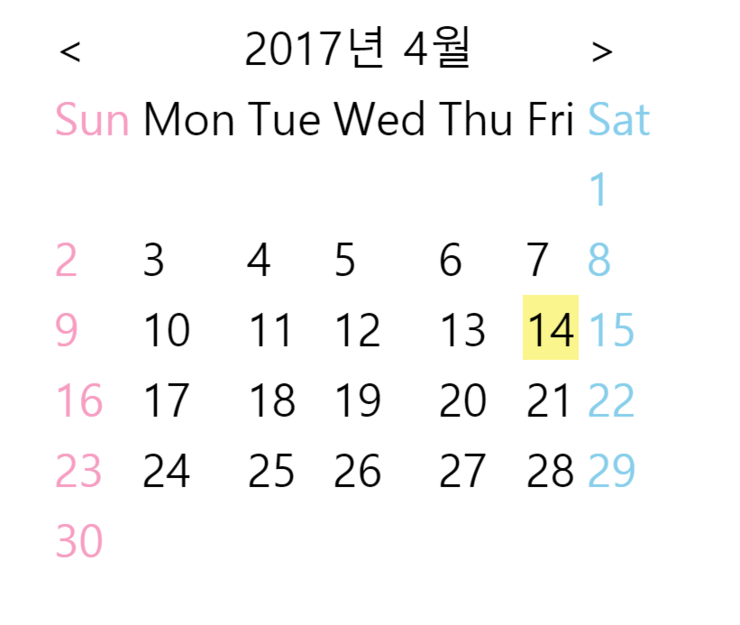
출력을 하게 되면 이렇게 되겠죠! 


1
2
3
4
5
6
7
8
9
10
11
12
13
14
15
16
17
18
19
20
21
22
23
24
25
26
27
28
29
30
31
32
33
34
35
36
37
38
39
40
41
42
43
44
45
46
47
48
49
50
51
52
53
54
55
56
57
58
59
60
61
62
63
64
65
66
67
68
69
70
71
72
73
74
75
76
77
78
79
80
81
82
83
84
85
86
87
88
89
90
91
92
93
94
95
96
97
98
99
100
101
102
103
104
105
106
107
108
109
110
111
112
113
114
115
116
117
118
119
120
121
122
123
124
125
126
127
128
129
130
131
132
133
134
135
136
137
138
139
140
141
142
143
144
145
146
147
148
149
150
151
152
153
<!DOCTYPE html>
<html>
<head>
<meta charset="UTF-8">
<title>계산기</title>
<style type="text/css">
.button1 {
    background-Color: #FFC5D0; /*--백그라운드 정의---*/
    font: 12px; /*--폰트 정의---*/
    font-weight: bold; /*--폰트 굵기---*/
    color: #8FFFE0; /*--폰트 색깔---*/
}
 
.button2 {
    background-Color: #FFB78F;
    font: 12px;
    color: #FAD4DC;
}
 
.button3 {
    background-Color: #FFCFB5;
    font: 12px;
    color: #9B558E;
}
 
.button4 {
    background-Color: #D2ECC4;
    font: 12px;
    color: #50917D;
}
</style>
<script language="javascript">
    function num(chr) {
        var input = document.getElementById("display");
        if (input.value == null || input.value == "0") {
            input.value = chr;
        } else {
            input.value += chr;
        }
        return input.value
    }
 
    function deletee(input) {
        input.value = input.value.substring(0, input.value.length - 1)
    }
 
    function pie(input) {
        input.value = eval(input.value) * PI
    }
 
    function change(input) {
        if (input.value.substring(0, 1) == "-")
            input.value = input.value.substring(1, input.value.length)
        else
            input.value = "-" + input.value
    }
    function sqrt(input) {
        input.value = Math.sqrt(input.value);
    }
    function tan(input) {
        input.value = Math.tan((input.value*3.141592)/180);
    }
    function sin(input) {
        input.value = Math.sin((input.value*3.141592)/180);
    }
    function cos(input) {
        input.value = Math.cos((input.value*3.141592)/180);
    }
    function log(input) {
        input.value = log(input.value)
    }
 
    function cal(input) {
        input.value = eval(input.value)
    }
    function square(input) {
        input.value = eval(input.value) * eval(input.value)
    }
</script>
</head>
<body marginheight="80">
    <form>
        <table align="center" width="150" height="250">
            <tr>
                <td align="center" colspan="6"><input type="text"
                    style="color: #72A1FF" id="display" size="20" value="0"></td>
            </tr>
            <tr>
                <td align="center" id="Clear" width="30"><input type="button"
                    value="C" size="40" maxlength="20" class="button1"
                    onClick="this.form.display.value = 0 "></td>
                <td align="center" id="result" colspan="2" width="30"><input type="button"
                    value="<-" class="button1" onclick="deletee(this.form.display)"></td>
                <td align="center" id="result" width="30"><input type="button"
                    value="=" class="button1" onclick="cal(this.form.display)"></td>
                <td align="center" width="30"><input type="button" id="root"
                    value="√" class="button4" onclick="sqrt(this.form.display)"></td>
                    
            </tr>
            <tr>
                <td align="center" width="30"><input type="button" value="1"
                    class="button2" onclick="num(1)"></td>
                <td align="center" width="30"><input type="button" value="2"
                    class="button2" onclick="num(2)"></td>
                <td align="center" width="30"><input type="button" value="3"
                    class="button2" onclick="num(3)"></td>
                <td align="center" width="30"><input type="button" value="+"
                    class="button3" onclick="num('+')"></td>
                <td align="center" width="30"><input type="button" value="x^2"
                    class="button4" onclick="square(this.form.display)"></td>
            </tr>
            <tr>
                <td align="center" width="30"><input type="button" value="4"
                    class="button2" onclick="num(4)"></td>
                <td align="center" width="30"><input type="button" value="5"
                    class="button2" onclick="num(5)"></td>
                <td align="center" width="30"><input type="button" value="6"
                    class="button2" onclick="num(6)"></td>
                <td align="center" width="30"><input type="button" value="-"
                    class="button3" onclick="num('-')"></td>
                <td align="center"><input type="button" value="sin"
                    class="button4" onclick="sin(this.form.display)"></td>
 
            </tr>
            <tr>
                <td align="center" width="30"><input type="button" value="7"
                    class="button2" onclick="num(7)"></td>
                <td align="center" width="30"><input type="button" value="8"
                    class="button2" onclick="num(8)"></td>
                <td align="center" width="30"><input type="button" value="9"
                    class="button2" onclick="num(9)"></td>
                <td align="center" width="30"><input type="button" value="*"
                    class="button3" onclick="num('*')"></td>
                <td align="center"><input type="button"value="cos"
                    class="button4" onclick="cos(this.form.display)"></td>
            </tr>
            <tr>
                <td align="center" width="30"><input type="button" id="pnnum"
                    value="+/-" class="button3" onclick="change(this.form.display)"></td>
                <td align="center" width="30"><input type="button" value="0"
                    class="button2" onclick="num(0)"></td>
                <td align="center" width="30"><input type="button" id="point"
                    value="." class="button3" onclick="num('.')"></td>
                <td align="center" width="30"><input type="button" value="/"
                    class="button3" onclick="num('/')"></td>
                <td align="center" width="30"><input type="button"
                    value="tan" class="button4" onclick="tan(this.form.display)"></td>
            </tr>
 
        </table>
    </form>
</body>
</html>

결과는 밑과 같이 나옵니다!


지난 번에는 html로 만든 회원가입 페이지 를 만들어 보았습니다~ 오늘 포스팅하는 건 유효성 검사를 포함한 회원가입 페이지입니다.

Colored By Color Scripter
1
2
3
4
5
6
7
8
9
10
11
12
13
14
15
16
17
18
19
20
21
22
23
24
25
26
27
28
29
30
31
32
33
34
35
36
37
38
39
40
41
42
43
44
45
46
47
48
49
50
51
52
53
54
55
56
57
58
59
60
61
62
63
64
65
66
67
68
69
70
71
72
73
74
75
76
77
78
79
80
81
82
83
84
85
86
87
88
89
90
91
92
93
94
95
96
97
98
99
100
101
102
103
104
105
106
107
108
109
110
111
112
113
114
115
116
117
118
119
120
121
122
123
124
125
126
127
128
129
130
131
132
133
134
135
136
137
138
139
140
141
142
143
144
145
146
147
148
149
150
151
152
153
154
155
156
157
158
159
160
161
162
163
164
165
166
167
168
169
170
171
172
173
174
175
176
177
178
179
180
181
182
183
184
185
186
187
188
189
190
191
192
193
194
195
196
197
198
199
200
201
202
203
204
205
206
207
208
209
210
211
212
213
214
215
216
217
218
219
220
221
222
223
224
225
226
227
228
229
230
231
232
233
234
235
236
237
238
239
240
241
242
243
244
245
246
247
248
249
250
251
252
253
254
255
256
257
258
259
260
261
262
263
264
265
266
267
268
269
270
271
272
273
274
275
276
277
278
279
280
281
282
283
284
285
286
287
288
289
290
291
292
293
294
295
296
297
298
299
300
301
302
303
304
305
306
307
308
309
310
311
312
313
314
<!DOCTYPE html>
<html>
<head>
<meta charset="UTF-8">
<title>회원 가입 페이지</title>
<script type="text/javascript">
    function sendIt() {
        var email = document.f.my_add.value;
        var regex = /^([\w-]+(?:\.[\w-]+)*)@((?:[\w-]+\.)*\w[\w-]{0,66})\.([a-z]{2,6}(?:\.[a-z]{2})?)$/;
         var jumin1 = document.f.my_num.value.substr(0,6);
          var jumin2 =document.f.my_num.value.substr(6,7);
          var yy     = jumin1.substr(0,2);        // 년도
          var mm     = jumin1.substr(2,2);        // 월
          var dd     = jumin1.substr(4,2);        // 일
          var genda  = jumin2.substr(0,1);        // 성별
          var msg, ss, cc;
        //아이디 입력여부 검사
        if (f.my_id.value == "") {
            alert("아이디를 입력하지 않았습니다.")
            f.my_id.focus()
            return false;
        }
        //아이디 유효성 검사 (영문소문자, 숫자만 허용)
        for (i = 0; i < document.f.my_id.value.length; i++) {
            ch = document.f.my_id.value.charAt(i)
            if (!(ch >= '0' && ch <= '9') && !(ch >= 'a' && ch <= 'z')&&!(ch >= 'A' && ch <= 'Z')) {
                alert("아이디는 대소문자, 숫자만 입력가능합니다.")
                document.f.my_id.focus()
                document.f.my_id.select()
                return false;
            }
        }
        //아이디에 공백 사용하지 않기
        if (document.f.my_id.value.indexOf(" ") >= 0) {
            alert("아이디에 공백을 사용할 수 없습니다.")
            document.f.my_id.focus()
            document.f.my_id.select()
            return false;
        }
        //아이디 길이 체크 (4~12자)
        if (document.f.my_id.value.length<4 || document.f.my_id.value.length>12) {
            alert("아이디를 4~12자까지 입력해주세요.")
            document.f.my_id.focus()
            document.f.my_id.select()
            return false;
        }
        //비밀번호 입력여부 체크
        if (document.f.my_pwd.value == "") {
            alert("비밀번호를 입력하지 않았습니다.")
            document.f.my_pwd.focus()
            return false;
        }
        if (f.my_pwd.value == f.my_id.value) {
            alert("아이디와 비밀번호가 같습니다.")
            document.f.my_pwd.focus()
            return false;
        }
        //비밀번호 길이 체크(4~8자 까지 허용)
        if (document.f.my_pwd.value.length<4 || document.f.my_pwd.value.length>12) {
            alert("비밀번호를 4~12자까지 입력해주세요.")
            document.f.my_pwd.focus()
            document.f.my_pwd.select()
            return false;
        }
 
        //비밀번호와 비밀번호 확인 일치여부 체크
        if (document.f.my_pwd.value != document.f.my_pwd1.value) {
            alert("비밀번호가 일치하지 않습니다")
            document.f.my_pwd1.value = ""
            document.f.my_pwd1.focus()
            return false;
        }
 
        if (document.f.my_add.value == "") {
            alert("이메일을 입력하지 않았습니다.")
            document.f.my_add.focus()
            return false;
        }
        
 
        if (regex.test(email) === false) {
            alert("잘못된 이메일 형식입니다.");
            document.f.my_add.value=""
            document.f.my_add.focus()
            return false;
        }
        if (document.f.my_name.value == "") {
            alert("이름을 입력하지 않았습니다.")
            document.f.my_name.focus()
            return false;
        }
        if(document.f.my_name.value.length<2){
            alert("이름을 2자 이상 입력해주십시오.")
            document.f.my_name.focus()
            return false;
        }
        
        if (document.f.my_num.value == "") {
            alert("주민번호를 입력하지 않았습니다.")
            document.f.my_num.focus()
            return false;
        }
        if (document.f.my_num.value.length<13||document.f.my_num.value.length>13) {
            alert("주민번호 길이가 맞지 않습니다.")
            document.f.my_num.value = ""
            document.f.my_num.focus()
            return false;
        }
    
          // 숫자가 아닌 것을 입력한 경우
          if (!isNumeric(jumin1)) {
            alert("주민번호는 숫자로 입력하세요.");
            document.f.my_num.value = ""
            document.f.my_num.focus()
            return false;
          }
          
          // 첫번째 자료에서 연월일(YYMMDD) 형식 중 기본 구성 검사
          if (yy < "00" 
              || yy > "99" 
              || mm < "01" 
              || mm > "12" 
              || dd < "01" 
              || dd > "31") {
            alert("주민등록번호다시 입력하세요.");
            document.f.my_num.value = ""
                document.f.my_num.focus()
            return false;
          }
          
          // 숫자가 아닌 것을 입력한 경우
          if (!isNumeric(jumin2)) {
            alert("주민등록번호는 숫자로 입력하세요.");
            document.f.my_num.value = ""
                document.f.my_num.focus()
            return false;
          }
          
          // 성별부분이 1 ~ 4 가 아닌 경우
          if (genda < "1" || genda > "4") {
            alert("주민등록번호 다시 입력하세요.");
            document.f.my_num.value = ""
                document.f.my_num.focus()
            return false;
          }
          
          // Check Digit 검사
          if (!isSSN(jumin1, jumin2)) {
            alert("존재하는 주민번호가 아닙니다.");
            document.f.my_num.value = ""
                document.f.my_num.focus()
            return false;
          }
          f.my_year.value ="19" +jumin1.charAt(0) + jumin1.charAt(1);
            f.my_month.value = parseInt(jumin1.charAt(2))+parseInt(jumin1.charAt(3));
            f.my_date.value = parseInt(jumin1.charAt(4)+jumin1.charAt(5));
            
          if(document.f.hobby[0].checked==false && 
                    document.f.hobby[1].checked==false && 
                    document.f.hobby[2].checked==false && 
                    document.f.hobby[3].checked==false && 
                    document.f.hobby[4].checked==false){
                 alert("관심분야를 체크해 주세요");
                 return false;
              }
          
          if(document.f.my_intro.value== ""){
              alert("자기소개를 입력해주십시오.");
              document.f.my_intro.focus()
              return false;
          }
          if(document.f.my_intro.length>100){
              alert("자기소개는 100자 이내입니다.");
              document.f.my_intro.focus()
              return false;
          }
        }
 
         
        function isNumeric(s) { 
          for (i=0; i<s.length; i++) { 
            c = s.substr(i, 1); 
            if (c < "0" || c > "9"return false; 
          } 
          return true; 
        }
         
        function isSSN(s1, s2) {
          n = 2;
          sum = 0;
          for (i=0; i<s1.length; i++)
            sum += parseInt(s1.substr(i, 1)) * n++;
          for (i=0; i<s2.length-1; i++) {
            sum += parseInt(s2.substr(i, 1)) * n++;
            if (n == 10) n = 2;
          }
          
          c = 11 - sum % 11;
          if (c == 11) c = 1;
          if (c == 10) c = 0;
          if (c != parseInt(s2.substr(6, 1))) return false;
          else return true;
 
        document.f.submit()
    }
</script>
</head>
 
<body align="center" marginwidth="0" marginheight="10">
    <embed src="넌 행복해.mp3">
    <form name="f" method="post" onsubmit="return sendIt();"
        action="mailto:rmlfa96@naver.com">
        <table width="800" height="250" border="1" align="center">
            <tr align="left">
                <td align="center" colspan="2" bgcolor="pink"><B>회원 기본 정보</B></td>
            </tr>
            <tr align="left">
                <td align="center" bgcolor="lightgreen"><b>아이디:</b></td>
                <td><input type="text" name="my_id" id="my_id" size="20"
                    maxlength="12">4~12자의 영문 대소문자와 숫자로만 입력</td>
            </tr>
            <tr align="left">
                <td align="center" bgcolor="lightgreen"><b>비밀번호:</b></td>
                <td><input type="password" name="my_pwd" id="my_pwd" size="20"
                    maxlength="12">4~12자의 영문 대소문자와 숫자로만 입력</td>
            </tr>
            <tr align="left">
                <td align="center" bgcolor="lightgreen"><b>비밀번호 확인:</b></td>
                <td><input type="password" name="my_pwd1" size="20"
                    maxlength="12"></td>
            </tr>
            <tr align="left">
                <td align="center" bgcolor="lightgreen"><b>메일 주소:</b></td>
                <td><input type="text" name="my_add" id="my_add" size="20">예>id@domain.com</td>
            </tr>
            <tr align="left">
                <td align="center" bgcolor="lightgreen"><b>이름:</b></td>
                <td><input type="text" name="my_name" id="my_name" size="20"
                    maxlength="7"></td>
            </tr>
            <tr>
                <td align="center" colspan="2" bgcolor="skyblue"><B>개인 신상정보</B></td>
            </tr>
            <tr align="left">
                <td align="center" bgcolor="lightgreen"><b>주민등록번호:</b></td>
                <td><input type="text" name="my_num" size="20" maxlength="13">예)1234561234567</td>
            </tr>
            <tr align="left">
                <td align="center" bgcolor="lightgreen"><b>생일:</b></td>
                <td><input type="text" name="my_year" size="4" maxlength="4"><select
                    name="my_month" id="my_month">
                        <option value="1">1</option>
                        <option value="2">2</option>
                        <option value="3">3</option>
                        <option value="4">4</option>
                        <option value="5">5</option>
                        <option value="6">6</option>
                        <option value="7">7</option>
                        <option value="8">8</option>
                        <option value="9">9</option>
                        <option value="10">10</option>
                        <option value="11">11</option>
                        <option value="12">12</option>
                </select><select name="my_date" id="my_date">
                        <option value="1">1</option>
                        <option value="2">2</option>
                        <option value="3">3</option>
                        <option value="4">4</option>
                        <option value="5">5</option>
                        <option value="6">6</option>
                        <option value="7">7</option>
                        <option value="8">8</option>
                        <option value="9">9</option>
                        <option value="10">10</option>
                        <option value="11">11</option>
                        <option value="12">12</option>
                        <option value="13">13</option>
                        <option value="14">14</option>
                        <option value="15">15</option>
                        <option value="16">16</option>
                        <option value="17">17</option>
                        <option value="18">18</option>
                        <option value="19">19</option>
                        <option value="20">20</option>
                        <option value="21">21</option>
                        <option value="22">22</option>
                        <option value="23">23</option>
                        <option value="24">24</option>
                        <option value="25">25</option>
                        <option value="26">26</option>
                        <option value="27">27</option>
                        <option value="28">28</option>
                        <option value="29">29</option>
                        <option value="30">30</option>
                        <option value="31">31</option>
                </select></td>
            </tr>
            <tr align="left">
                <td align="center" bgcolor="lightgreen"><b>관심분야:</b></td>
                <td><input type="checkbox" name="hobby">컴퓨터 <input
                    type="checkbox" name="hobby">인터넷 <input type="checkbox"
                    name="hobby">여행 <input type="checkbox" name="hobby">영화감상
                    <input type="checkbox" name="hobby">음악감상</td>
            </tr>
            <tr align="left">
                <td align="center" bgcolor="lightgreen"><b>자기소개:</b></td>
                <td><textarea name="my_intro" id="my_intro" cols="80" rows="5"></textarea></td>
            </tr>
        </table>
        <br> <br> <input type="submit" value="회원가입"
            onclick="sendit()"> <input type="reset" value="다시 입력">
    </form>
</body>
</html>


1
2
3
4
5
6
7
8
9
10
11
12
13
14
15
16
17
18
19
20
21
22
23
24
25
26
27
28
29
30
31
32
33
34
35
36
37
38
39
40
41
42
43
44
45
46
47
48
49
50
51
52
53
54
55
56
57
58
59
60
61
62
63
64
65
66
67
68
69
70
71
72
73
74
75
76
77
78
79
80
81
82
83
84
85
<!DOCTYPE html>
<!-- span 태그 -->
<html>
<head>
<meta charset="UTF-8">
<title>자바스크립트 이너클래스</title>
<script langauge="javascript">
    function inputHTML() {
        var text = document.getElementById("preview");
        var color = document.getElementById("fontColor").value;
        var size = document.getElementById("size").value;
 
        var font = document.getElementsByName("fstyle");
        var local = document.getElementsByName("flocal");
        var letter = document.getElementsByName("fletter");
 
        var result = text.value.fontcolor(color).fontsize(size);
 
        if (font[0].checked == true) {
            result = result.strike();
        }
 
        if (font[1].checked == true) {
            result = result.bold();
        }
        if (font[2].checked == true) {
            result = result.italics();
        }
        
        if(local[0].checked==true){
            result=result.sup();
        }
        if(local[1].checked==true){
            result=result.sub();
        }
        if(letter[0].checked==true){
            result=result.toLowerCase();
        }
        if(letter[1].checked==true){
            result=result.toUpperCase();
        }
 
        document.getElementById("prev").innerHTML = result;
    }
</script>
</head>
<body align="center" background="#FAFABE">
    <input type="text" id="preview">
    <input type="button" value="미리 보기" onclick="inputHTML()">
    <br> 색상:
    <select id="fontColor">
        <option value="#000000">검정색</option>
        <option value="#5AE0FF">하늘색</option>
        <option value="#FFC5D0">분홍색</option>
        <option value="#bebebe">회색</option>
        <option value="#4BAF4B">연두색</option>
    </select>
    <br> 크기:
    <select id="size">
        <option value="1">1</option>
        <option value="2">2</option>
        <option value="3">3</option>
        <option value="4">4</option>
        <option value="5">5</option>
        <option value="6">6</option>
        <option value="7">7</option>
    </select>
    <br>
    <input type="checkbox" name="fstyle" >취소선
 
    <input type="checkbox" name="fstyle" >두껍게
    <input type="checkbox" name="fstyle">기울임
    <br>
 
    <input type="radio" name="flocal" value="위첨자">위첨자
    <input type="radio" name="flocal" value="아래첨자">아래첨자
    <input type="radio" name="fletter" value="소문자로">소문자로
    <input type="radio" name="fletter" value="대문자로">대문자로
    
    <br>
    <span id="prev"></span>
 
 
</body>
</html>


1
2
3
4
5
6
7
8
9
10
11
12
13
14
15
16
17
18
19
20
21
22
23
<!DOCTYPE html>
<html>
<head>
<meta charset="UTF-8">
<title>Insert title here</title>
<script>
var txt = "Hello World!";
document.write("<p>big: " + txt.big() + "</p>");
document.write("<p>small: " + txt.small() + "</p>");
document.write("<p>bold: " + txt.bold() + "</p>");
document.write("<p>기울기: " + txt.italics() + "</p>");
document.write("<p>??: " + txt.fixed() + "</p>");
document.write("<p>: 줄긋기" + txt.strike() + "</p>");
document.write("<p>색: " + txt.fontcolor("green") + "</p>");
document.write("<p>크기: " + txt.fontsize(1) + "</p>");
document.write("<p>아래: " + txt.sub() + "</p>");
document.write("<p>위: " + txt.sup() + "</p>");
</script>
</head>
<body>
 
</body>
</html>


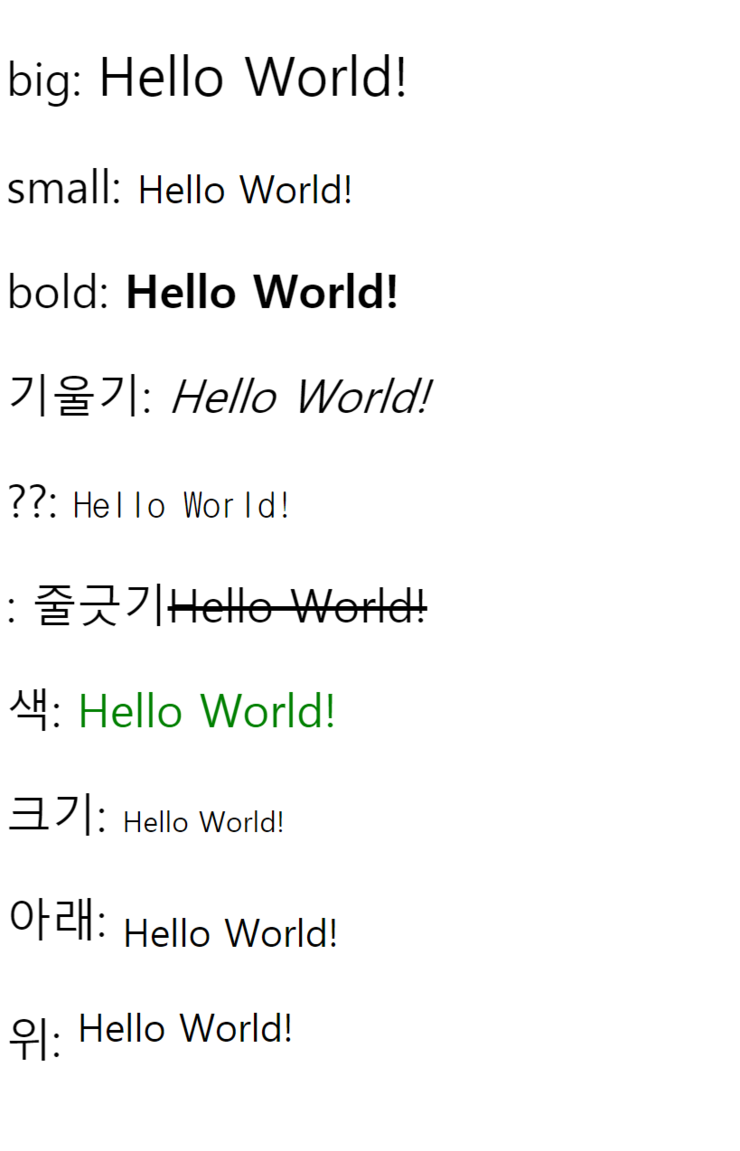
실행했을때


+ Recent posts